Tuscan Villa Elegance is a stylish photo editing idea that brings together luxury, travel, fashion, and classic Italian beauty. It can turn a simple photo of a man into a high-end scene with a beautiful Tuscan villa and a powerful red sports car. Also see more prompts on prompt plum
This style is perfect if you want your photo to look rich, cinematic, and natural. In this guide, you will find five ready-to-use AI photo editing prompts, simple steps and tips to help you create the look you want.
What Is Tuscan Villa Elegance?
Tuscan Villa Elegance is an AI photo editing style inspired by the warm beauty of Tuscany, Italy. It often uses old stone villas, green hills, warm sunlight, luxury cars, stylish clothes, and clean cinematic colors.
Imagine yourself standing beside a bright red sports car in front of a large Italian villa. The scene has warm evening light, stone walls, trees, and a calm luxury mood.
Why Is It Trending?
Luxury travel and lifestyle photos are popular on Instagram, Facebook, TikTok, and other social platforms. People enjoy photos that look like they were taken during an expensive vacation or professional photoshoot.
The red sports car adds a strong visual point to the image, while the Tuscan setting gives it a warm and elegant feel.
Best Prompts
Editorial Portrait Prompt
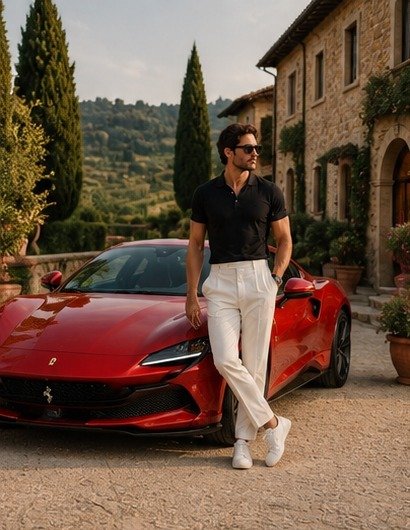
A photorealistic full-body luxury fashion portrait of a stylish man standing beside a glossy red Ferrari Purosangue in an elegant Italian villa courtyard. He wears a fitted black short-sleeve polo shirt, dark slim-fit tailored trousers, white sneakers, sunglasses, and a luxury wristwatch in a relaxed confident pose. One hand rests naturally on the Ferrari’s hood while the other rests near his trouser pocket, legs casually crossed at the ankles.
Composition: Vertical full-body composition, subject positioned centered, Ferrari prominently filling the lower and middle-left frame, elegant villa architecture and fountains creating depth in the background. Keep the entire subject, car, and footwear visible.
Background: Luxurious Italian villa courtyard with historic cream-colored architecture, stone paving, ornate stone fountains, olive trees, tall slender cypress trees, manicured greenery, and warm Mediterranean atmosphere.
Lighting: Soft warm golden-hour sunlight, natural directional light, subtle highlights on the red Ferrari paint, gentle shadows, cinematic contrast, realistic reflections.
Camera: Eye-level camera angle, 85mm lens, f/1.6, shallow depth of field, sharp focus on subject and car, softly blurred background, aspect ratio 4:5.
Style: Ultra-realistic luxury editorial photography, premium automotive fashion campaign, ultra-detailed skin texture, realistic fabric details, accurate proportions, cinematic color grading, HDR, 8K resolution, highly detailed, photorealistic.
Negative prompt: distorted anatomy, Ferrari badge, blurry subject, oversaturated colors, artificial skin, excessive retouching, text, watermark, logo distortion.
Editorial Portrait Prompt
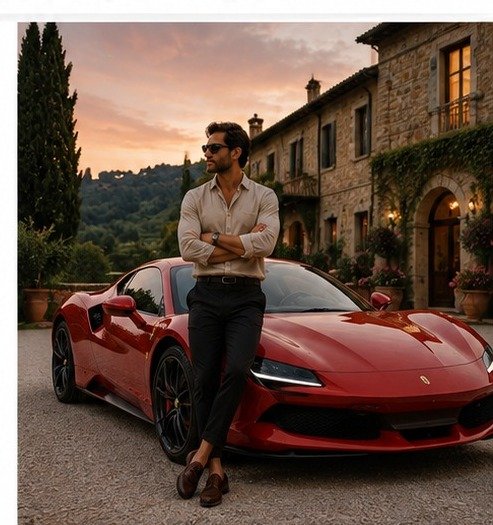
A photorealistic full-body cinematic portrait of a man leaning against a glossy red Ferrari 296 GTB in front of a grand Tuscan villa at sunset. He wears a light beige linen shirt with the sleeves rolled up, dark tailored trousers, and brown leather loafers. He has black sunglasses and a stylish wristwatch. His arms are crossed, and he is looking away thoughtfully.
Composition: Full-body vertical composition, man and car centered in frame, villa entrance and driveway creating symmetry and depth. Entire subject, car, and shoes visible.
Background: Grand Tuscan villa entrance with stone archways, warm exterior lights, potted flowers, ivy-covered walls, gravel driveway, and a dramatic sunset sky.
Lighting: Warm sunset glow, soft ambient light, realistic shadows, subtle reflections on the car, cinematic atmosphere.
Camera: Eye-level angle, 85mm lens, f/1.6, shallow depth of field, sharp subject and car, softly blurred background, aspect ratio 4:5.
Style: Ultra-realistic luxury lifestyle photography, cinematic color grading, natural skin texture, realistic fabrics, premium automotive detail, HDR, 8K.
Negative prompt: distorted anatomy, Ferrari badge, text, watermark, logo, blurry subject, artificial skin, oversaturated colors.
Editorial Portrait Prompt
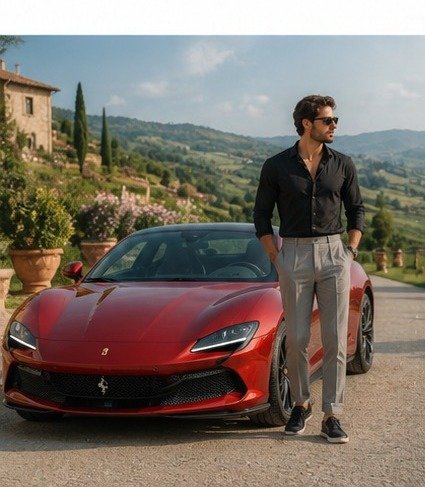
A photorealistic full-body portrait of a man standing beside a glossy red Ferrari Roma on a scenic Tuscan hillside road. He wears a black long-sleeve shirt with the sleeves rolled up, light gray tailored trousers, and black sneakers. He has stylish sunglasses and a luxury watch. He stands casually with one hand in his pocket, looking to the side.
Composition: Vertical full-body composition, subject and car centered, entire body and footwear visible, car filling lower left frame, scenic hills creating depth.
Background: Tuscan countryside with rolling hills, vineyards, cypress trees, rustic stone buildings, and a clear blue sky with soft clouds.
Lighting: Bright natural sunlight, soft shadows, realistic reflections on car, vibrant yet natural colors.
Camera: Eye-level angle, 85mm lens, f/1.8, shallow depth of field, sharp focus on subject and car, softly blurred background, aspect ratio 4:5.
Style: Ultra-realistic luxury travel photography, cinematic composition, natural skin texture, realistic fabric details, premium automotive photography, HDR, 8K.
Negative prompt: distorted anatomy, Ferrari badge, text, watermark, logo, overly edited skin, blurry subject.
How to Use
- Choose a clear photo of yourself. A sharp photo with good lighting usually works best.
- Open an AI photo editing tool that supports image uploads.
- Upload your photo.
- Copy one of the prompts above.
- Add details such as your outfit, car style, or preferred lighting.
- Generate the image.
- Check your face, hands, car, and background.
- If something looks wrong, ask the AI to fix only that part.
- Try another prompt if you want a different mood.
Best AI Tools
ChatGPT: Useful for creating and editing realistic images from detailed prompts.
Gemini: Helpful for experimenting with photo edits and creative scene changes.
Adobe Firefly: A good choice for creative image generation and controlled visual edits.
Midjourney: Useful when you want a highly cinematic and artistic visual style.
Canva AI: Handy for quick edits and preparing your final image for social media or a blog.
Tips and Tricks
- Use a clear photo: A sharp original image gives the AI more useful details.
- Protect your identity: Tell the tool to keep your face and natural features unchanged.
- Describe the light: Golden-hour, morning, and sunset lighting can create very different results.
- Keep the scene simple: Too many objects can make the image look messy.
- Match the shadows: The person, car, and villa should have similar lighting.
- Try different outfits: A suit creates a formal look, while a shirt and trousers give a relaxed travel style.
- Generate more than one version: Small changes in your prompt can create very different results.
Common Issues
Face looks different: Tell the AI to preserve your original facial structure, skin tone, and identity.
Car looks unrealistic: Add words such as “realistic reflections,” “accurate proportions,” and “professional automotive photography.”
Background looks fake: Ask for natural lighting, realistic shadows, and consistent depth of field.
Hands look strange: Generate another version or ask the tool to correct the hands while keeping the rest of the image unchanged.
Colors look too strong: Ask for natural colors and realistic photography instead of an overly saturated style.
Conclusion
Tuscan Villa Elegance is a great way to create a luxury travel photo without needing a real Italian photoshoot. With the right photo and a clear prompt, you can create scenes with a beautiful Tuscan villa, a red sports car, stylish clothing, and cinematic lighting.
Try the five prompts above and change small details to make the final image match your own style. The best results usually come from keeping your face natural and making the lighting, shadows, and background work together.

2 Comments